在单体仓库中运行任务
每个单体仓库都有两个主要构建块:工作区和任务。假设您有一个包含三个工作区的单体仓库,每个工作区都有三个任务

这里,apps/web 和 apps/doc 都使用来自 packages/shared 的代码。事实上,当它们被构建(通过 build)时,它们需要 packages/shared 先被构建。
大多数工具没有针对速度进行优化
假设我们想在所有工作区中运行所有任务。使用像 yarn 这样的工具,您可能会运行类似这样的脚本
yarn workspaces run lint
yarn workspaces run test
yarn workspaces run build
这将意味着任务按以下方式运行
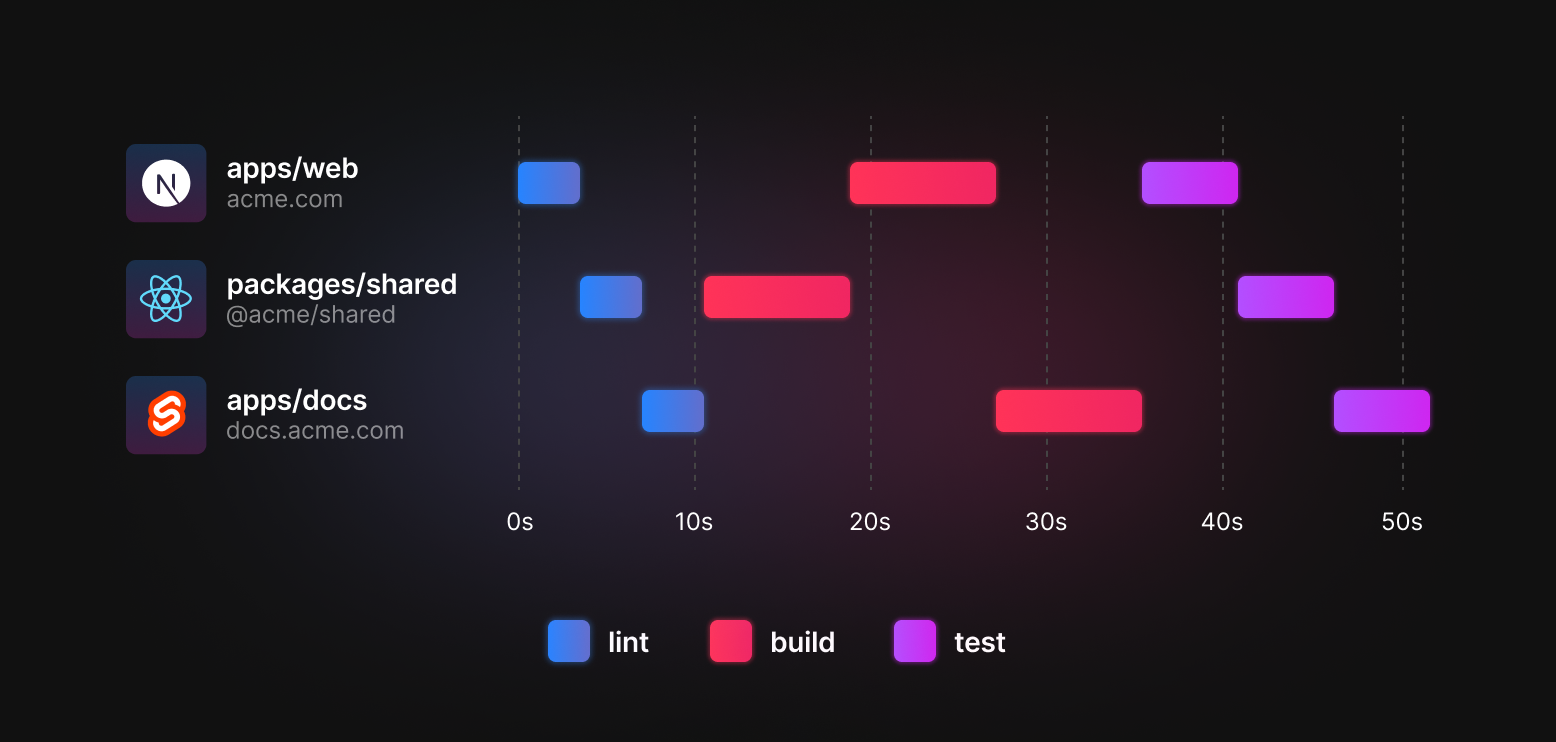
如您所见,lint 在所有工作区中运行。然后,build 运行 - shared 首先运行。最后,test 运行。
这是运行这些任务最慢的方式。每个任务都需要等待前一个任务完成才能开始。为了改进这一点,我们需要一个可以进行多任务处理的工具。
Turborepo 可以进行多任务处理
Turborepo 可以通过了解任务之间的依赖关系来安排任务以获得最大速度。
首先,我们在 turbo.json 中声明我们的任务
{
  "$schema": "https://turbo.net.cn/schema.json",
  "pipeline": {
    "build": {
      "outputs": [".next/**", "!.next/cache/**", ".svelte-kit/**"],
      // ^build means `build` must be run in dependencies
      // before it can be run in this workspace
      "dependsOn": ["^build"]
    },
    "test": {},
    "lint": {},
    "dev": {
      "cache": false,
      "persistent": true
    }
  }
}
接下来,我们可以用这个替换我们的 yarn workspaces 脚本
- yarn workspaces run lint
- yarn workspaces run test
- yarn workspaces run build
+ turbo run lint test build
当我们运行它时,Turborepo 将在所有可用的 CPU 上尽可能多地进行多任务处理,这意味着我们的任务按以下方式运行
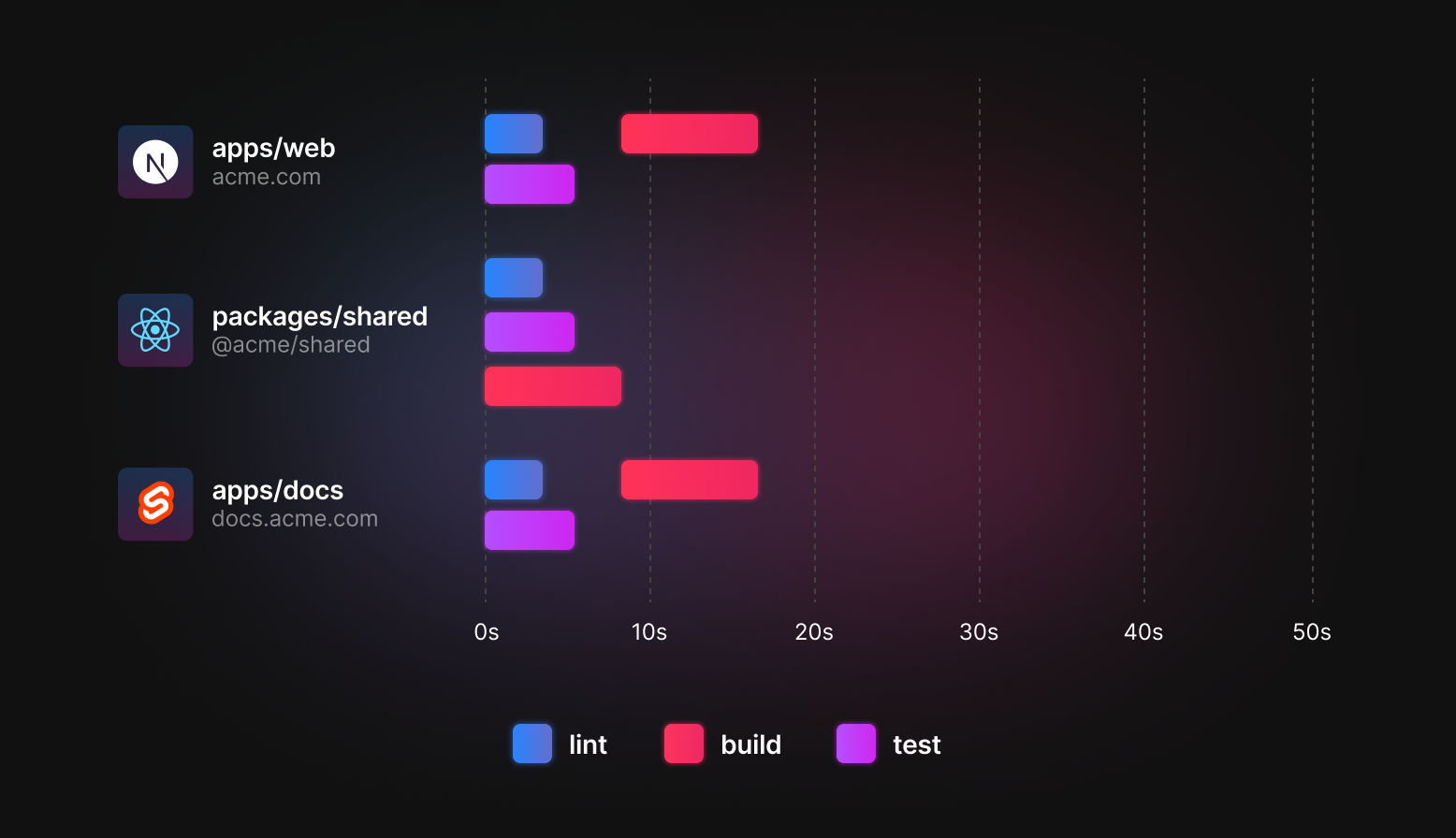
lint 和 test 立即运行,因为它们在 turbo.json 中没有指定 dependsOn。
shared 中的 build 任务首先完成,然后 web 和 docs 随后构建。
定义管道
pipeline 配置声明了单体仓库中哪些任务相互依赖。以下是一个包含所有内容的示例
{
  "$schema": "https://turbo.net.cn/schema.json",
  "pipeline": {
    "build": {
      // A workspace's `build` task depends on that workspace's
      // topological dependencies' and devDependencies'
      // `build` tasks  being completed first. The `^` symbol
      // indicates an upstream dependency.
      "dependsOn": ["^build"],
      "outputs": [".next/**", "!.next/cache/**", ".svelte-kit/**"]
    },
    "deploy": {
        // A workspace's `deploy` task depends on the `build`,
        // `test`, and `lint` tasks of the same workspace
        // being completed.
        "dependsOn": ["build", "test", "lint"]
    },
    "test": {
      // A workspace's `test` task depends on that workspace's
      // own `build` task being completed first.
      "dependsOn": ["build"],
      // A workspace's `test` task should only be rerun when
      // either a `.tsx` or `.ts` file has changed.
      "inputs": ["src/**/*.tsx", "src/**/*.ts", "test/**/*.ts", "test/**/*.tsx"]
    },
    // A workspace's `lint` task has no dependencies and
    // can be run whenever.
    "lint": {},
    "dev": {
      "cache": false,
      "persistent": true
    }
  }
}
您可以在下一节关于 任务依赖关系 中阅读有关如何设置任务的更多信息。
从根目录运行任务
turbo 可以运行存在于单仓库根目录下的 package.json 文件中的任务。这些任务必须使用键语法 "//#<task>" 显式添加到管道配置中。即使对于已经拥有自己条目的任务,这也是正确的。例如,如果您的管道声明了一个 "build" 任务,并且您想使用 turbo run build 包含在单仓库根目录的 package.json 文件中定义的 build 脚本,则必须通过在配置中声明 "//#build": {...} 将根目录选择加入。相反,如果您只需要 "//#my-task": {...},则 *不需要* 定义一个通用的 "my-task": {...} 条目。
定义根任务 format 并且将根目录选择加入 test 的示例管道可能如下所示
{
  "$schema": "https://turbo.net.cn/schema.json",
  "pipeline": {
    "build": {
      "dependsOn": ["^build"],
      "outputs": [".next/**", "!.next/cache/**", ".svelte-kit/**"]
    },
    "test": {
      "dependsOn": ["^build"],
    },
    // This will cause the "test" script to be included when
    // "turbo run test" is run
    "//#test": {
      "dependsOn": [],
    },
    // This will cause the "format" script in the root package.json
    // to be run when "turbo run format" is run. Since the general
    // "format" task is not defined, only the root's "format" script
    // will be run.
    "//#format": {
      "dependsOn": [],
      "outputs": ["dist/**/*"],
      "inputs": ["version.txt"]
    }
  }
}关于递归的说明:在单仓库根目录的 package.json 文件中定义的脚本通常会调用 turbo 本身。例如,build 脚本可能是 turbo run build。在这种情况下,在 turbo run build 中包含 //#build 将导致无限递归。正是出于这个原因,从单仓库根目录运行的任务必须通过在管道配置中包含 //#<task> 来显式选择加入。 turbo 包含一些尽力而为的检查,以便在递归情况下产生错误,但您有责任只选择加入那些不会触发 turbo 运行的任务,这些运行会递归。
增量采用
在您在 turbo.json 中声明一个任务后,您需要在您的 package.json 清单中实现它。您可以一次性添加所有脚本,也可以一次添加一个工作区。Turborepo 将优雅地跳过在各自的 package.json 清单中不包含该任务的工作区。
例如,如果您的仓库有三个工作区(类似于上面提到的工作区)
apps/
  web/package.json
  docs/package.json
packages/
  shared/package.json
turbo.json
package.json
其中 turbo.json 声明了一个 build 任务,但只有两个 package.json 实现了该 build 任务
{
  "$schema": "https://turbo.net.cn/schema.json",
  "pipeline": {
    "build": {
      "outputs": [".next/**", "!.next/cache/**", "dist/**"]
    }
  }
}
turbo run buildturbo 构建只会对 web 和 docs 工作区执行 build 脚本。 shared 包仍然将是任务图的一部分,但将被优雅地跳过。
Turborepo 的管道 API 设计和此文档页面受到 Microsoft 的 Lage 项目 (在新标签页中打开) 的启发。感谢 Kenneth Chau (在新标签页中打开) 为以如此简洁优雅的方式扩展任务的想法。