Turborepo 0.4.0

- 姓名
- Jared Palmer
- X
- @jaredpalmer
我很高兴地宣布 Turborepo v0.4.0 发布了!
- 速度提升 10 倍:
turbo已用 Go 从头重写,使其速度更快 - 更智能的哈希:改进的哈希算法现在考虑已解析的依赖项,而不仅仅是整个根锁文件的内容
- 部分锁文件 / 稀疏安装:生成根锁文件和 Monorepo 的精简子集,其中仅包含给定目标所需的必要包
- 细粒度调度:通过
pipeline配置改进了任务编排和选项 - 更好的缓存控制:您现在可以按任务指定缓存输出
用 Go 重写
尽管我最初用 TypeScript 对 turbo 进行了原型设计,但很明显,路线图中的某些项需要更好的性能。经过大约一个月的努力,我很高兴终于发布了 Go 版本的 turbo CLI。它不仅在几毫秒内启动,而且新的 Go 实现的哈希速度比 Node.js 实现快 10 到 100 倍。有了这个新的基础(以及您即将阅读到的一些功能),Turborepo 现在可以扩展到星际规模的项目,同时 благодаря Go 出色的并发控制,它仍然保持极快的速度。
更好的哈希
在 v0.4.0 中,哈希不仅更快,而且更智能。
主要变化是 turbo 不再将根锁文件的内容哈希包含在其哈希器中(负责确定给定任务是否存在于缓存中或需要执行的算法)。相反,turbo 现在根据根锁文件对包的 dependencies 和 devDependencies 的解析版本集合进行哈希。
旧的行为会在根锁文件以任何方式更改时使缓存失效。有了这种新行为,更改锁文件只会使受添加/更改/删除依赖项影响的包的缓存失效。虽然这听起来很复杂,但它再次意味着当您从 npm 安装/删除/更新依赖项时,只有实际受更改影响的包才需要重建。
实验性:精简工作区
我们最大的客户痛点/请求之一是改善使用大型 Yarn Workspaces(或任何工作区实现)时的 Docker 构建时间。核心问题是工作区最好的功能——将您的 Monorepo 减少到一个锁文件——在 Docker 层缓存方面也是最糟糕的。
为了阐明问题以及 turbo 现在如何解决它,让我们看一个示例。
假设我们有一个使用 Yarn 工作区的 Monorepo,其中包含一组名为 frontend、admin、ui 和 backend 的包。我们还假设 frontend 和 admin 是 Next.js 应用程序,它们都依赖于同一个内部 React 组件库包 ui。现在我们还假设 backend 包含一个 Express TypeScript REST API,它与 Monorepo 的其他部分没有太多代码共享。
这是 frontend Next.js 应用程序的 Dockerfile 可能的样子
虽然这有效,但有些事情可以做得更好
- 您手动
COPY内部包和构建目标应用程序所需的文件,并且需要记住哪些需要首先构建。 - 您在 Dockerfile 中很早地将根
yarn.lock锁文件COPY到正确的位置,但此锁文件是整个 Monorepo 的锁文件。
最后一个问题尤其令人痛苦,因为您的 Monorepo 变得越来越大,因为对该锁文件的任何更改都会触发几乎完全的重建,无论应用程序是否实际受到新/更改依赖项的影响。
....直到现在。
使用全新的 turbo prune 命令,您现在可以通过确定性地生成一个稀疏/部分 Monorepo 来修复这个噩梦,该 Monorepo 包含目标包的精简锁文件——而无需安装您的 node_modules。
让我们看看如何在 Docker 中使用 turbo prune。
那么 turbo prune 的输出究竟是什么?一个名为 out 的文件夹,其中包含以下内容
- 一个
json文件夹,其中包含精简工作区的 package.json 文件 - 一个
full文件夹,其中包含精简工作区的完整源代码,但仅包含构建目标所需的内部包 - 一个新的精简锁文件,其中仅包含原始根锁文件的精简子集,以及精简工作区中包实际使用的依赖项。
多亏了上述内容,现在可以设置 Docker,使其仅在有真正理由时才重建每个应用程序。因此,只有当 frontend 的源代码或依赖项(无论是内部的还是来自 npm 的)实际更改时,它才会重建。admin 和 backend 也是如此。对 ui 的更改,无论是其源代码还是依赖项,都将触发 frontend 和 admin 的重建,但不会触发 backend 的重建。
虽然这个例子看起来微不足道,但想象一下每个应用程序需要 20 分钟才能构建和部署。这些节省很快就会累积起来,尤其是在大型团队中。
管道
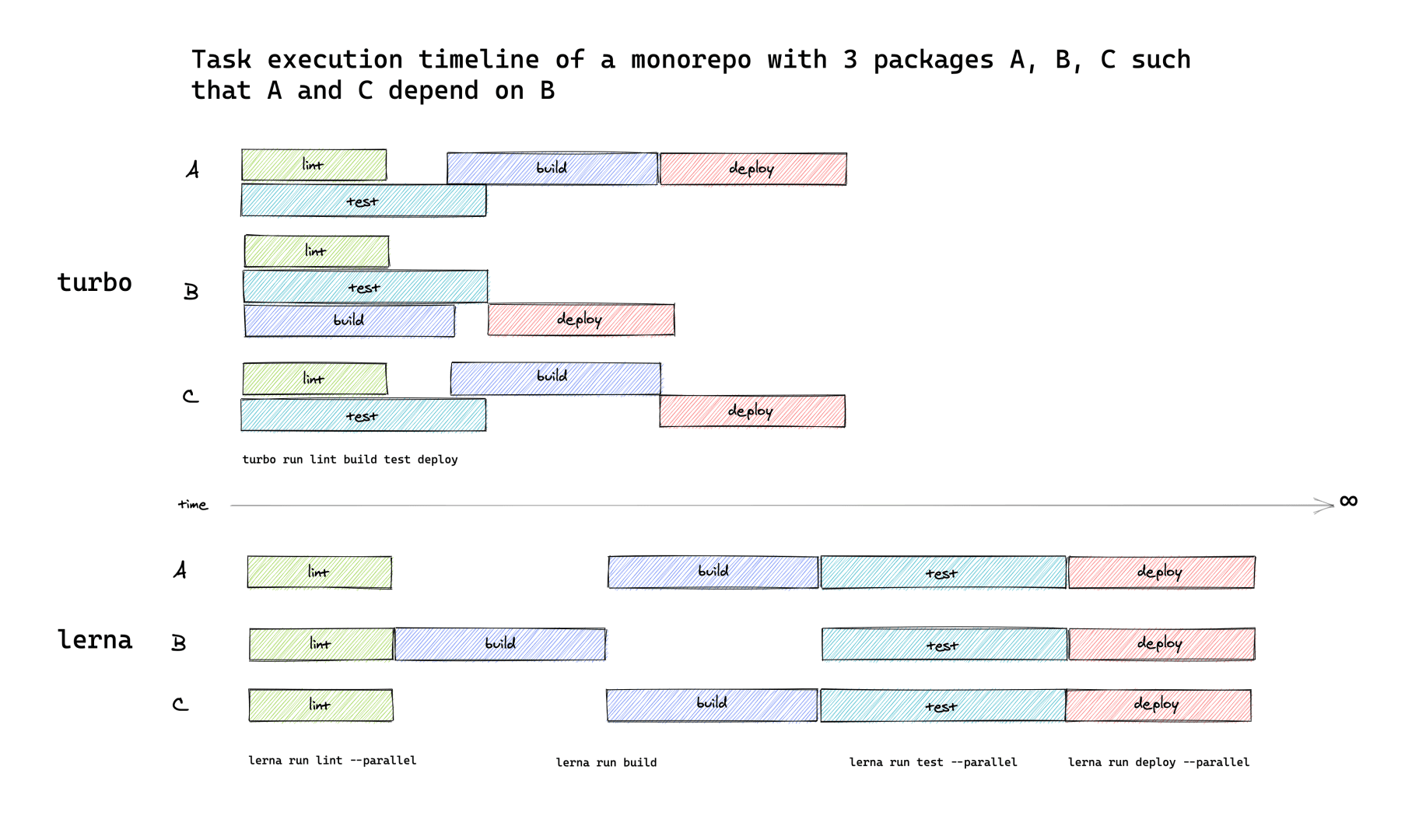
为了让您对 Turborepo 拥有更多控制权,我们已将 pipeline 添加到 turbo 的配置中。此新字段允许您指定 Monorepo 中 npm 脚本之间的关系以及一些额外的按任务选项。turbo 然后使用此信息来优化 Monorepo 中任务的调度,从而消除否则会存在的水帘。
以下是它的工作原理
turbo 将解释上述配置以优化调度执行。
这到底意味着什么?过去(如 Lerna 和 Nx),turbo 只能按拓扑顺序运行任务。随着管道的添加,turbo 现在除了实际的依赖图之外,还构建了一个拓扑“操作”图,它用于确定任务应以最大并发度执行的顺序。最终结果是您不再浪费空闲 CPU 时间等待事情完成(即不再有水帘)。
改进的缓存控制
多亏了 pipeline,我们现在有了一个很好的地方,可以按任务打开 turbo 的缓存行为。
在上面的示例基础上,您现在可以像这样在整个 Monorepo 中设置缓存输出约定
注意:目前,pipeline 存在于项目级别,但在以后的版本中,这些将可以在每个包的基础上覆盖。
下一步是什么?
我知道这很多,但还有更多内容。以下是 Turborepo 路线图上的下一步。
- 一个登陆页面!
- 远程缓存与
@turborepo/server - 构建扫描、遥测、指标以及依赖项和任务图可视化
- 桌面控制台用户界面
- 智能
watch模式 - TypeScript、React、Jest、Node.js、Docker、Kubernetes 等的官方构建规则
鸣谢
- Iheanyi Ekechukwu 感谢他指导我了解 Go 生态系统
- Miguel Oller 和 Makeswift 的团队感谢他们对新
prune命令的迭代